In the previous article, we walked through four representation approaches for world models. Today, we shift back to the practical side of DreamerV3 and talk about the pitfalls and tricks you encounter during training. This article is based on local experiments using DreamerV3 commit e3f02248, JAX + Haiku, and MuJoCo + DM Control. Parameter names and configurations may differ across versions.
DreamerV3 is currently one of the most open-source and mature world model implementations available. But if you’ve actually trained it, you know the process is far from easy — environment setup, hyperparameter tuning, training instability, slow convergence… the list of gotchas goes on.
This article summarizes the common problems and solutions I’ve encountered while training DreamerV3, in the hope that it helps you avoid some of the same pitfalls.
Environment Setup Pitfalls
1. MuJoCo Version Issues
The official DreamerV3 implementation is built on JAX + MuJoCo. But choosing the right MuJoCo version matters:
- MuJoCo 2.x vs 3.x. The official code is based on MuJoCo 2.x, but version 3.x includes performance improvements. If you use 3.x, you’ll need to modify some API calls.
- mujoco-py vs mujoco. mujoco-py is the legacy Python binding and is no longer maintained. It’s recommended to use the official mujoco package directly.
Recommendation: Start with the MuJoCo version that matches your current DreamerV3 commit. Don’t upgrade the entire environment right out of the gate.
2. JAX GPU Configuration
JAX’s GPU support requires correctly installed CUDA and cuDNN. Common issues:
- CUDA version mismatch. JAX has strict CUDA version requirements — check the official documentation before installing.
- GPU out of memory. By default, JAX will consume all available GPU memory. You can set
XLA_PYTHON_CLIENT_MEM_FRACTION=0.9to limit memory usage. If you hit memory spikes during compilation, you can also setXLA_PYTHON_CLIENT_PREALLOCATE=falseto disable pre-allocation. - Multi-GPU issues. JAX’s multi-GPU support works differently from PyTorch’s and requires special configuration.
The figure below shows actual GPU utilization during DreamerV3 training on an RTX 5090D. VRAM usage is approximately 25.6 GB (78% of 32 GB), with GPU utilization at 91%: 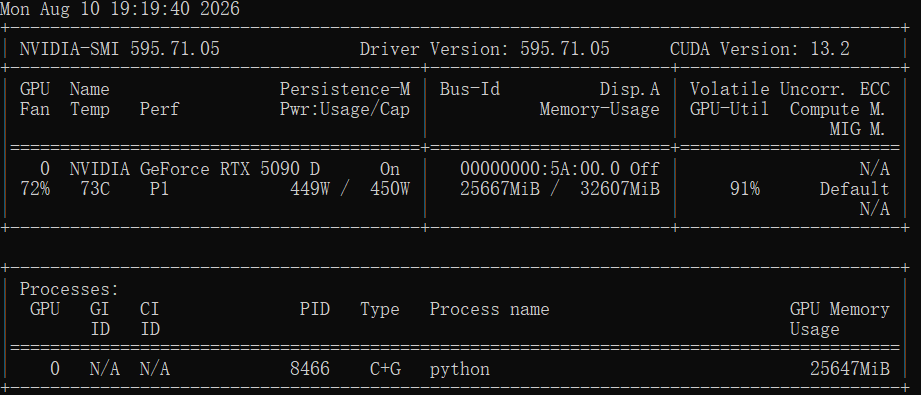 Figure: GPU VRAM usage during DreamerV3 training on RTX 5090D (25.6 GB / 32 GB, 91% utilization)
Recommendation: Run small experiments on CPU first to validate your code, then switch to GPU training.
3. Dependency Version Conflicts
DreamerV3’s dependencies include jax, haiku, optax, mujoco, and others — version conflicts between them are possible. Common issues:
- haiku and jax version incompatibility
- optax API changes causing code errors
- Mixing gymnasium and gym
Recommendation: Use the official requirements.txt or conda environment. Don’t upgrade packages arbitrarily.
Hyperparameter Tuning
DreamerV3 has more hyperparameters than a typical RL algorithm, making tuning a real challenge. Below are some practical insights on key parameters:
1. World Model Parameters
RSSM hidden state dimensions (deter_size, stoch_size). A common configuration is 4096 and 32. Note that DreamerV3’s stochastic latent is a discrete categorical state, not a standard continuous vector. If the task is simple, you can reduce these to 2048 and 16 to speed up training. For complex tasks (e.g., visual inputs), you may need to increase them.
Imagination training batch size (imag_batch). Typical configurations range from several hundred to over a thousand. If GPU memory is insufficient, you can reduce it to 512 or 256, but you’ll need to increase the number of gradient accumulation steps.
KL constraint parameters (similar to the KL free threshold in free bits). This parameter controls the regularization strength of the world model. In cases of training instability, try adjusting this parameter and observe how the KL constraint changes.
2. Actor-Critic Parameters
Learning rate (actor_lr, critic_lr). A common range is 1e-4 to 3e-4. If training is oscillating, try a smaller learning rate; if convergence is too slow, you can increase it moderately.
Discount factor (discount). A common value is 0.997. For long-horizon tasks, you can increase it to 0.999; for short-horizon tasks, you can decrease it to 0.99.
Entropy regularization. Encourages exploration. If the policy converges prematurely to a local optimum, increase entropy regularization; if the policy keeps exploring randomly, decrease it.
3. Data Collection Parameters
Training steps (train_steps). The default is 5e5 or 1e6. For simple tasks, 5e5 may be sufficient; for complex tasks, you may need 2e6.
Data collection frequency (collect_every). The default is to collect data every 16 steps. If the environment runs quickly, you can increase this to 32; if the environment is slow, you can decrease it to 8.
Common Causes of Training Instability
Training instability is the most frequent issue with DreamerV3. Below are common causes and their solutions:
1. Reward Scale Issues
DreamerV3 has built-in symlog transformation and return normalization to handle reward scaling. However, in practice, if the reward distribution is extremely skewed, it can still affect training stability.
Solution: Check the range of your reward values. If there’s a large disparity (e.g., 0.001 to 1000+), consider applying additional normalization or scaling to the rewards.
The figure below shows reward statistics for the cartpole_balance task at approximately 73k training steps. Average Reward rises steadily from 0.15 to 0.6, while Advantage and Advantage Magnitude both converge quickly to near zero within the first 10k steps — confirming that DreamerV3’s built-in symlog transformation and return normalization stabilize the reward signal early on:
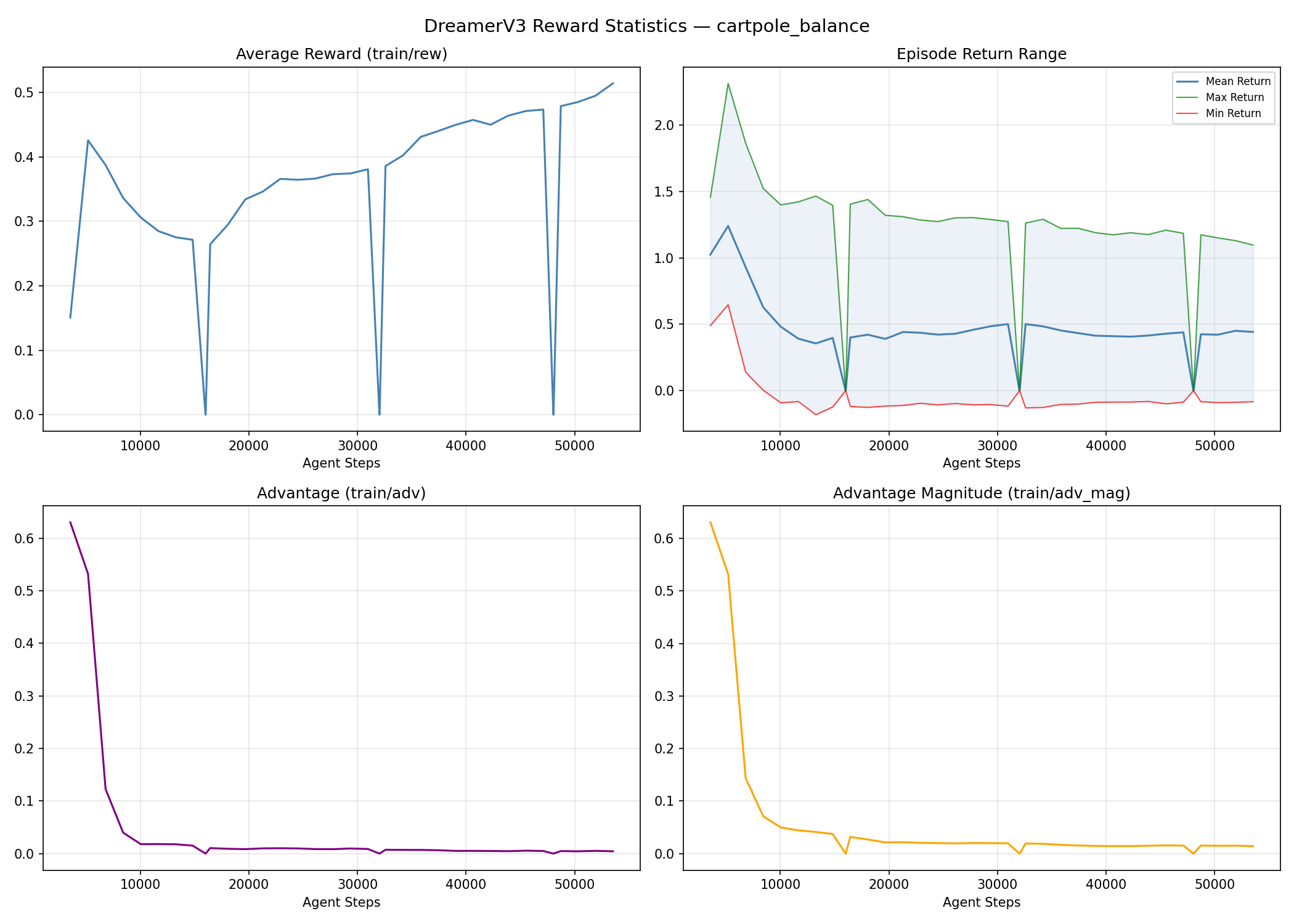 Figure: Reward statistics during DreamerV3 training (cartpole_balance task, approximately 73k steps)
2. Observation Normalization Issues
If you’re using a custom environment, observation values may vary widely across dimensions (e.g., some dimensions are 0-1 while others are 0-1000), making it difficult for the world model to learn.
Solution: Check the numerical range of your observations and ensure the input scales are reasonable. For custom environments, it’s recommended to normalize all observation dimensions to a similar range.
3. Imagination Training Collapse
Imagination training (imagined rollouts) is the core of DreamerV3, but it’s also prone to collapse. Common symptoms:
- State values in imagination explode (NaN or Inf)
- Action values in imagination become abnormally large
- Critic loss suddenly spikes
Solution:
- Reduce the imagination training batch size
- Adjust KL constraint parameters
- Apply gradient clipping to imagination states
- Check whether the world model loss is normal
4. Replay Buffer Issues
DreamerV3 uses an experience replay buffer to store data. If the buffer is too small or the data quality is poor, training will suffer.
Solution:
- Increase the buffer size (a common configuration is 1e6)
- Ensure the replay buffer contains sufficiently diverse data
The figure below shows how replay ratio and training FPS change during training. The replay ratio stabilizes around 260, indicating that data is being reused effectively; training FPS stays steady at 3,400–3,500 (the sharp dip in the middle is a brief pause during checkpoint saving):
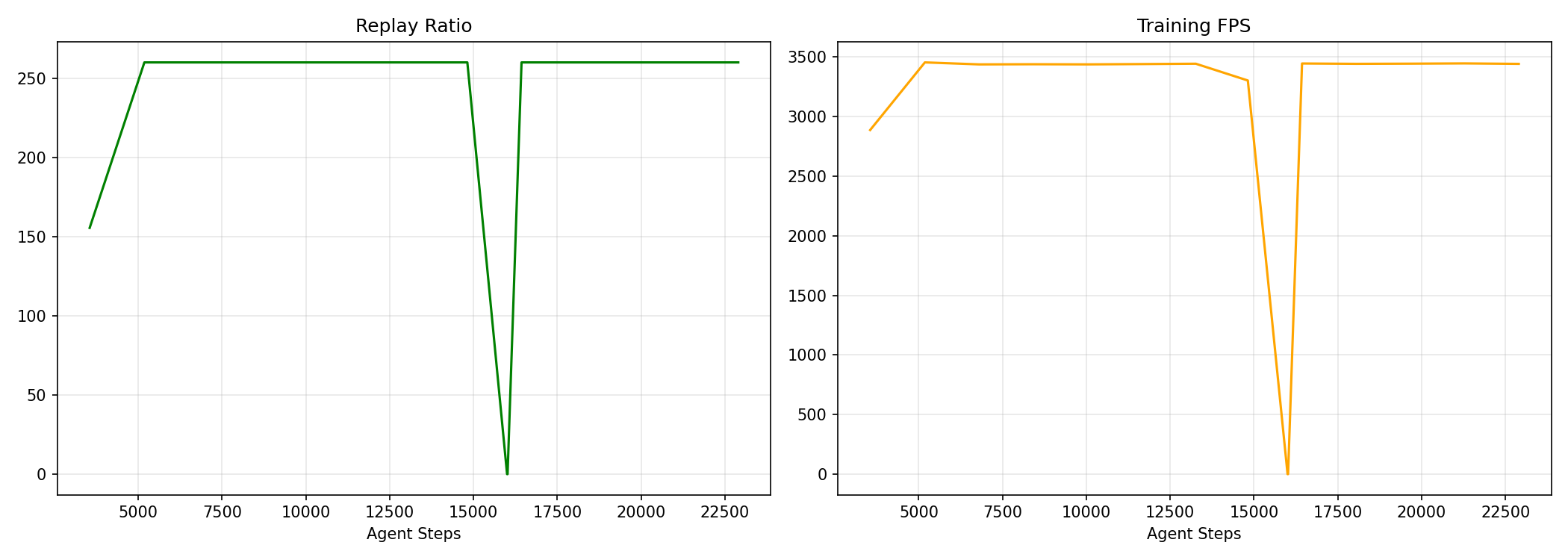 Figure: Replay ratio (left) and training FPS (right) during training
Debugging Tips
1. Start with a Small Model for Fast Iteration
Don’t jump straight to the default large model. Start with a smaller model (halve the hidden state dimensions) and run 1e5 steps to verify that your code and pipeline are correct. Once everything checks out, switch to the full model.
2. Monitor Key Metrics
During training, focus on these metrics:
- World model loss. Includes reconstruction loss, KL divergence, and reward prediction loss. Look for overall improvement — monotonic decrease is not required.
- Actor loss. Useful for detecting training anomalies, but don’t use it as a standalone convergence indicator.
- Critic loss. Watch for sudden explosions or sustained abnormal increases.
- Episode reward. Should gradually increase. If it never rises, the policy isn’t learning.
The figure below shows the loss curves for the cartpole_balance task at approximately 73k training steps. You can see Dynamics Loss dropping from 5.5 to 1.4, Decoder Loss falling from 102 to near zero, and both Value Loss and Reward Loss declining steadily — indicating that the world model and policy are learning normally:
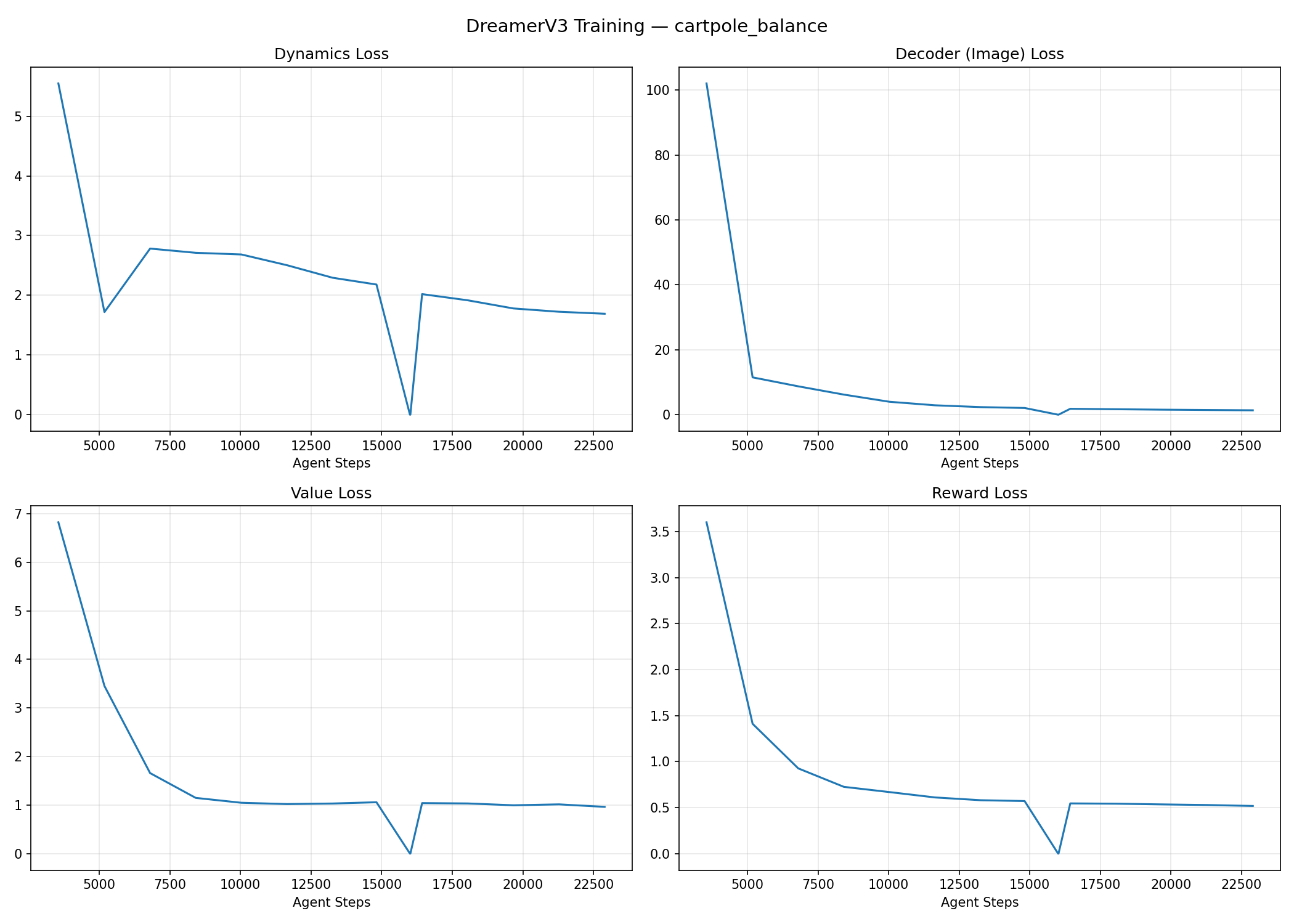 Figure: Key loss curves during DreamerV3 training (cartpole_balance task, approximately 73k steps)
3. Visualize Imagination Trajectories
One advantage of DreamerV3 is that you can visualize imagined trajectories. Check periodically:
- Whether imagined observations look reasonable
- Whether imagined rewards are consistent with real rewards
- Whether imagined actions are reasonable
If the imagined content diverges significantly from reality, the world model hasn’t learned properly.
4. Compare Against a Baseline
If possible, run a baseline (e.g., PPO or SAC) for comparison. DreamerV3 should outperform the baseline in sample efficiency, though final performance may be similar. If DreamerV3 is clearly worse than the baseline, something is wrong.
Convergence Criteria
How do you tell whether DreamerV3 has converged?
Episode reward has stabilized. The average reward over the last 100 episodes is no longer increasing noticeably.
World model loss has stabilized. The loss curve has plateaued with no significant fluctuations.
Imagination trajectories are reasonable. Imagined behavior is consistent with real behavior.
If all of the above conditions are met, you can consider the model converged. At this point, you can stop training or continue to see if there’s further improvement. It’s recommended to repeat experiments with different random seeds, since a single RL run may contain elements of chance.
The figure below shows the episode return progression for the cartpole_balance task. From approximately 15k to 73k steps, episode return rises steadily from 280 to 970 (theoretical perfect score is approximately 1000). The clear upward trend indicates that the policy is learning effectively and consistently:
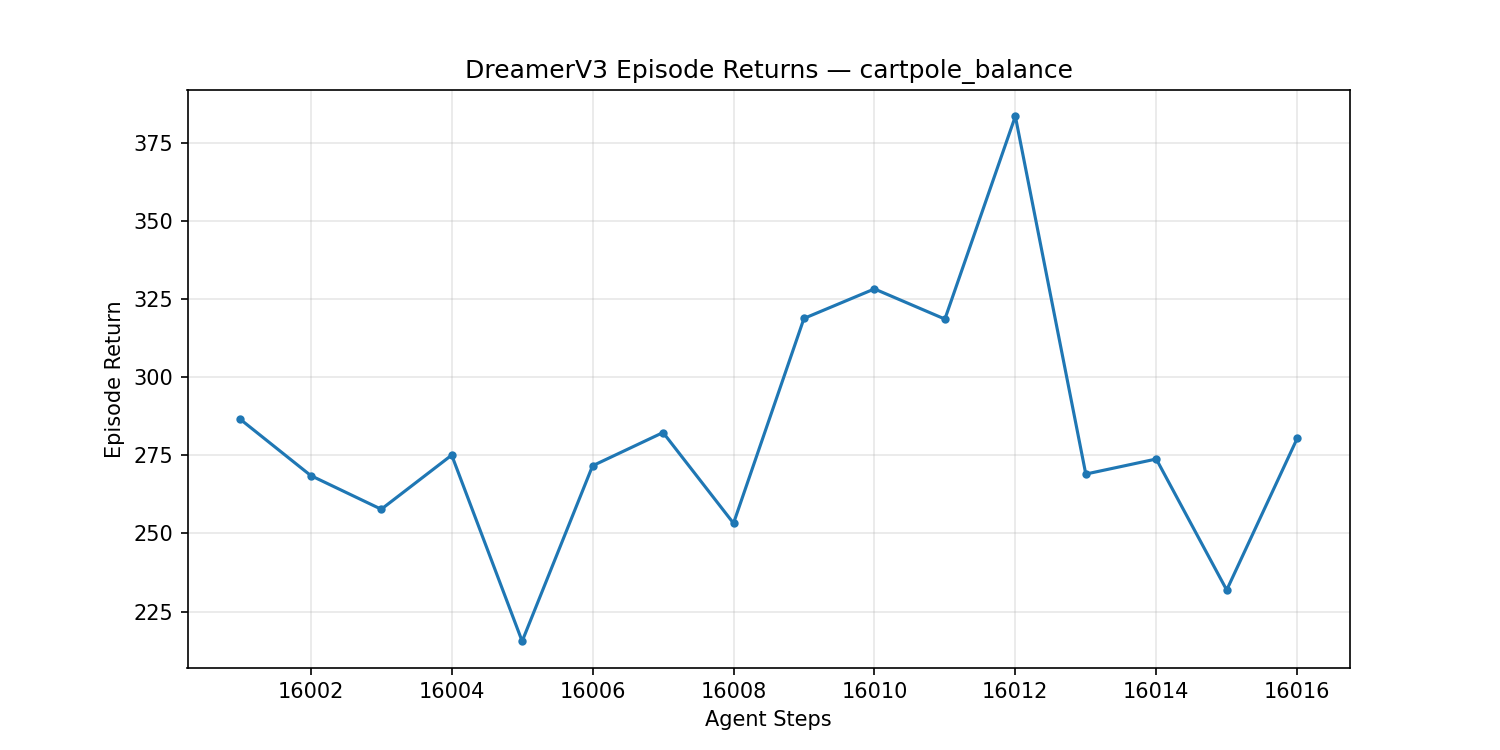 Figure: Episode return progression for the cartpole balance task (approximately 15k to 73k steps)
Summary
Training DreamerV3 is an engineering problem that requires patience and attention to detail. This article has summarized practical experience across environment setup, hyperparameter tuning, training instability, and debugging techniques — with the hope of helping you go from debugging to convergence.
Remember, there are no universal hyperparameters. Every task has its own characteristics and requires adjustment based on the specific situation. Experiment often, observe carefully, and summarize frequently — that’s the key to mastering DreamerV3.
Comments